Balls and Walls
Scott Foust
Complete Description:
The BAW Script language is not intended to be a fully featured development language. The goal in designing BAW Script is twofold. Firstly, to create an easily understood set of commands which allow the exploration of the concept of variables.
Secondly, to provide an entertaining environment that encourages the user to continue exploring the concept of variables.
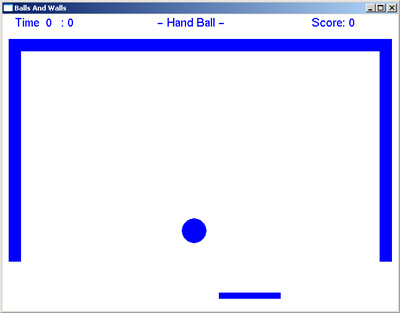
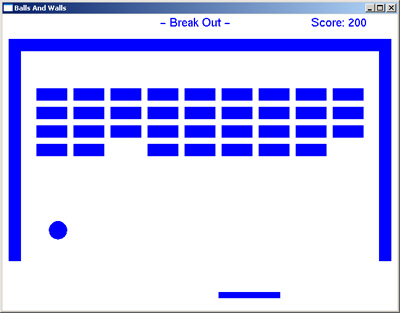
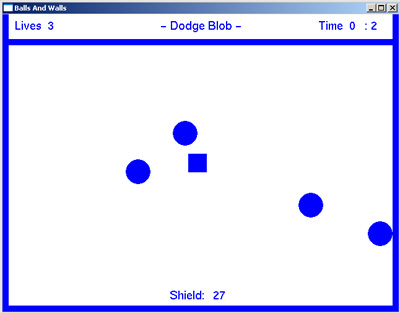
The entertaining environment that BAW provides is a simple, script driven, game development tool set.
|
The script language allows:
User Variables: 32 bit numbers only (-2,147,483,647 to 2,147,483,647).
System Variables: For getting and setting environment state (FRAME_RATE).
Operators: +, -, *, /.
Logic: If (=, <, >, <=, >=, not), End_If, Else, End_Else.
Objects: Balls, Walls, Paddles, Text
Functions for object manipulation: Make, Move, Delete, Set, Get.
Comments: #
Script Syntax: In an effort to keep it simple, the script language follows two main syntax rules.
1) Each script statement must be contained on one line.
2) Each component of the statement must be separated with white space.
The BAW
Script is divided into three sections that are separated by required section labels. These labels are START_PLAY and PLAY_AGAIN
make ball 150 100
ball_id = id
START_PLAY
move ball_id 1 0
if HIT > 0
STOP_PLAY
end_if
PLAY_AGAIN |
This script creates a ball (at screen coordinates 150, 100) and then moves it one pixel at a time in the x direction until it reaches the edge of the screen.
Each time the script reaches the PLAY_AGAIN command auto functions are executed (such as paddle positions), the screen is updated, and control branches back up to the first statement below the START_PLAY command. This loop stops only when the STOP_PLAY command is executed.
Once the STOP_PLAY is executed, control then branches to the next line after PLAY_AGAIN. Script execution stops when the last statement is reached.
User Variables: They are created as soon as they are referenced. The default value for all variables is zero (0). Variable names are not case sensitive (all variables names are converted to upper case internally).
This statement will create a new variable called MY_AGE and set it equal to 10.
This statement will create a new variable called YOUR_AGE, initialized to zero, and then set MY_AGE equal to YOUR_AGE.
This statement will add 5 to MY_AGE.
System Variables: There are many useful system variables available to the user. Some are writable; some are read-only. Here is a partial list.
RATE (not yet functional)
(writable) Number of frames per second. Setting to zero requires the user to press the space bar after every frame.
AUTO_PADDLE (not yet functional)
(writable) If not zero, paddle positions are updated each time PLAY_AGAIN is reached.
HIT
(writable) This variable is updated every time the Move command is executed. It is set to zero if there was no collision. Bits 1-4 indicate the direction of collision. 1 = hit top, 2 = hit right, 3 = hit bottom, 4 = hit left.
HIT_TYPE
(writable) The type of object last hit. 1 = wall, 2 = paddle, 3= ball, 4 = edge of screen.
HIT_ID
(writable) The ID of the last object hit.
ERROR (not yet functional)
(writable) None zero indicates that the last operation was not successful.
PADDLE_DIR_X
(not writable) This variable really indicate the state of the arrow keys on the keyboard. -1 = left, 1 = right, 0 if neither is press.
PADDLE_DIR_Y
(not writable) This variable really indicate the state of the arrow keys on the keyboard. -1 = up, 1 = down, 0 if neither is press.
Objects: There are several types of objects supported by BAW. They are manipulated though the accessor commands that follow. Here are the objects available and the attributes they support (attributes in parenthesis are optional and show with default values). The * character is used as a place holder for non-required values. (Note: optional attributes have yet to be implemented.)
BALL x y 10 (blue)
WALL upltfX uplftY lowrtX lowrtY (blue)
PADDLE upltfX uplftY lowrtX lowrtY (horizontal) (keyleft) (keyright) (blue)
TEXT x y text (green)
Object Manipulators: These commands are used to manipulate object in the game.
MAKE object
<see object section for list of arguments>
If successful, the system variable ID is set to that of the newly created object. If the creation of an object causes a collision, the object is not created and the system variable ERROR is set.
MOVE id x y
This manipulator tries to move the specified object the requested distance specified. If a collision is detected, the object is moved as far as possible. The HIT, HIT_ID, HIT_TYPE variables are updated after every move command.
DELETE id
Removes and existing object from the game. If no such object exists, the system variable ERROR is set.
SET id argument_index value
<see object section for argument order>
Updates the attributes of an existing object. If the update of the object causes a collision, the object is not repositioned and the system variable ERROR is set. If no such object exists, the system variable ERROR is set.(not yet functional)
GET id argument_index
<see object section for argument order>
The system variable GET_VALUE is set with value of the requested argument from the specified object. If no such object exists, the system variable ERROR is set. (not yet functional)
|